Day Planner App
The Day Planner App That Actually Helps You Finish Your Day
Every day starts on the Briefing: today's meetings, what's due, what slipped, and who you need to talk to. Drag the tasks you'll actually do into Tasks for today, press Start My Day, and todovo gets out of the way. Five minutes in the morning, five in the evening.
Your task list is long. Your day is short.
Most planners help you capture everything. That's the easy part. The hard part is knowing which five things to actually do today — and staying focused on them when everything else is competing for your attention.
todovo gives you a morning ritual: a structured, five-minute planning session that categorizes your work, surfaces today's meetings, and lets you drag exactly what you'll commit to into a daily focus list. Then it gets out of the way.
Tasks Sort Themselves by Urgency
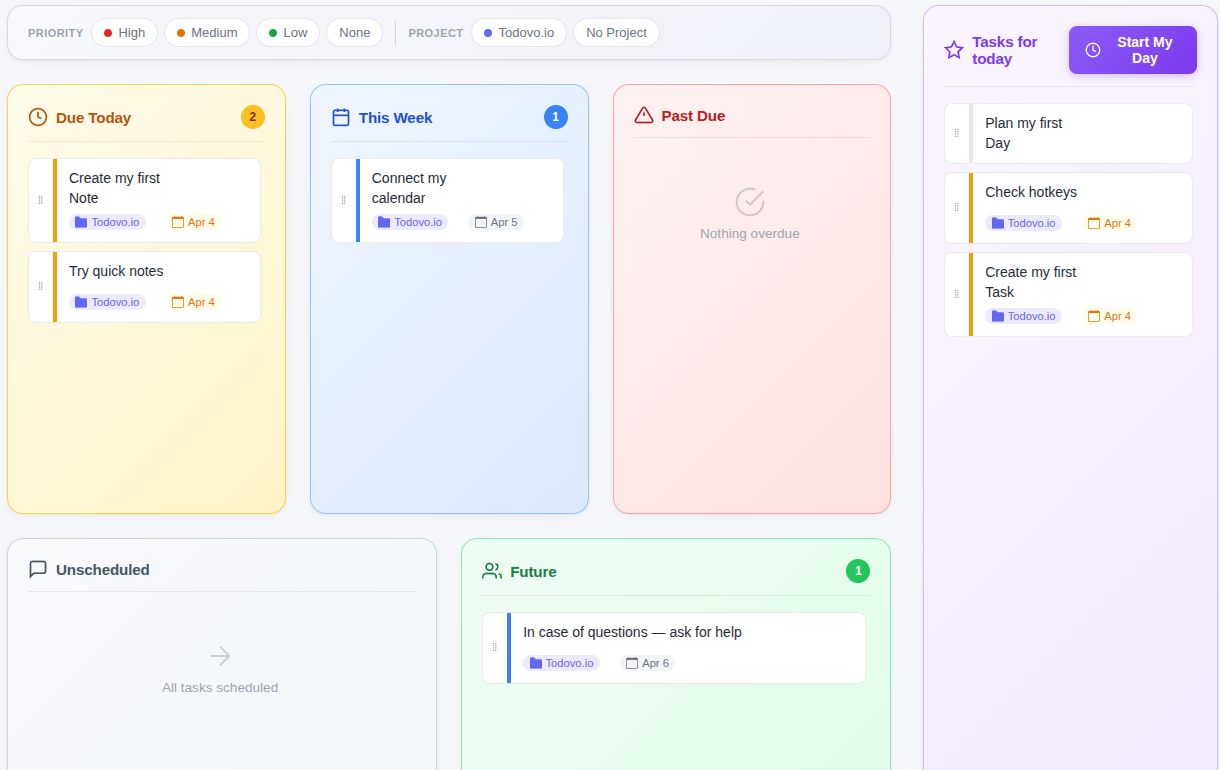
The daily planner auto-categorizes every task before you even think about it. Due today, due this week, overdue, unscheduled, or far in the future — each task finds its place. You arrive to a pre-sorted view that immediately shows you where the pressure is.
No tagging, no manual sorting. Just open the planner and your work is already organized.
- Due Today — tasks that need to happen now
- This Week — upcoming work on the horizon
- Past Due — overdue tasks that need a decision
- Unscheduled — ideas and backlog without a deadline
- Future — tasks scheduled beyond this week
Five categories. Zero effort.
Every task lands in the right bucket automatically based on its due date. Your morning starts with clarity, not chaos.
Drag What You'll Actually Do Into Your Day
The day planner has two sides: your task categories on the left, and Tasks for today on the right. You drag only the tasks you're genuinely committing to into your daily plan. That constraint is intentional — a short list you'll complete beats a long one you'll avoid.
Reorder tasks within your daily plan to match how you want to work through them. Remove tasks if your plan changes. The list is yours to control.
- Drag tasks from any category into your daily plan
- Reorder within the daily plan by priority or energy
- Remove tasks and return them to their original category
- Drag a task into another box and its due date follows
- Filter categories by project to focus on a specific area
Commit, don't collect.
Dragging a task into your day is a small act of intention. It changes how you treat that task — from "maybe" to "yes."
See Today's Meetings Before Your Day Starts
Connect Google Calendar and your meetings appear inside the morning planning view. Before you start working, you can see what's coming, review talking points you prepared, and plan your focused work around the gaps.
Meetings stop being surprises. They become anchors you can plan around.
- Today's calendar events appear in the morning plan
- Talking points and notes visible before the meeting starts
- Plan focused work blocks around your meeting schedule
- Meeting notes carry over from your preparation
Tasks and meetings in one view.
Your full day — what you plan to do and when you're blocked by meetings — visible in one morning glance.
My Day: Work Through Tasks One at a Time
After morning planning you land on My Day. Click a task, or press Ctrl+its number. When you switch away and come back, your cursor is exactly where you left it. Need to capture a quick thought? Press Alt+Q and Quick Notes opens without leaving your task.
When the last task is done, todovo celebrates. A completion screen acknowledges what you finished, so the day ends with a clear sense of accomplishment rather than a list of things you didn't get to.
- My Day with instant task switching via keyboard shortcuts
- Quick Notes for capturing thoughts mid-task
- Mark complete and move to the next with one click
- Day completion celebrates your finished tasks
On a Mac, Option for Alt and Command for Ctrl.
Your task. Your flow.
My Day keeps your current task front and center, with instant switching and Quick Notes always within reach.
Everything the daily planner includes
Auto-categorized tasks
Due Today, This Week, Past Due, Unscheduled, and Future — organized automatically based on due dates.
Drag-and-drop daily plan
Drag tasks from any category into your Tasks for today list. Reorder them any way you like.
Meeting review
Today's Google Calendar events appear in your morning plan with talking points and notes attached.
Optional task review
Before planning, review yesterday's incomplete tasks and decide what carries forward — and what to drop.
My Day with fast switching
Work through your daily tasks with instant switching via Ctrl+1, Ctrl+2, Ctrl+3 and Quick Notes on the side.
Project filter
Filter the day planner by project when you need to focus on one area without other tasks in view.
Start Planning Your Day — Free for 30 Days
No credit card. No limits. Cancel anytime.