Task Management Built for Software Engineers
Deep work is your most valuable asset. todovo is built around protecting it — keyboard-first navigation, instant task switching, quick notes on the side, and zero friction between you and the thing you're trying to build.
The real cost of context switching
Interrupted before you reach flow
It takes 23 minutes to fully regain focus after an interruption. Between Slack, standups, and PR reviews, most engineers never get there at all.
Context switching is expensive
Every tab-switch, tool-switch, and notification costs you working memory. Your brain is full before you've written a single line of code.
Started 10 things, shipped nothing
You've got four branches open, three Jira tickets in progress, and two Slack threads half-answered. By 3pm it all blurs together into a low-grade sense of failure.
No personal system alongside team tools
Jira is for the team. Notion is for the docs. Your own daily priorities — what you need to tackle today — have no home.
A system built around how engineers actually work
No sprints, no burn-down charts. Just a personal daily system that gets out of your way.
Plan once in the morning, then go
The day planner shows you everything — overdue, due today, this week, unscheduled. Pick 3–5 tasks. Drag them into your daily focus. One decision in the morning eliminates all future decision fatigue.
Switch tasks without losing your place
Four branches open means four tasks open. Click a task, or press Ctrl+its number. Each task is a living document: add notes, write down your progress, and everything saves as you type. When you switch away and come back, your cursor is exactly where you left it. You just keep typing.
Built for power users, but you don't have to memorize a pile of shortcuts to feel like one.
A Slack ping, a PR review request, a colleague at your desk. Press Alt+Q, type it, and get back to work. At the end of the day you review every quick note and turn it into a task, add it to a note, or let it go. Hold Alt and the hints appear right on the screen. Alt+E brings back what you touched last. Ctrl+K finds anything.
On a Mac, Option for Alt and Command for Ctrl.
End the day with a summary, not a question mark
The daily summary shows what you completed, what's still open, and what you accomplished this week. No more end-of-day blur. You'll know exactly what you shipped — even if your standup is first thing tomorrow.
The editor is your scratchpad, spec, and tracker — in one
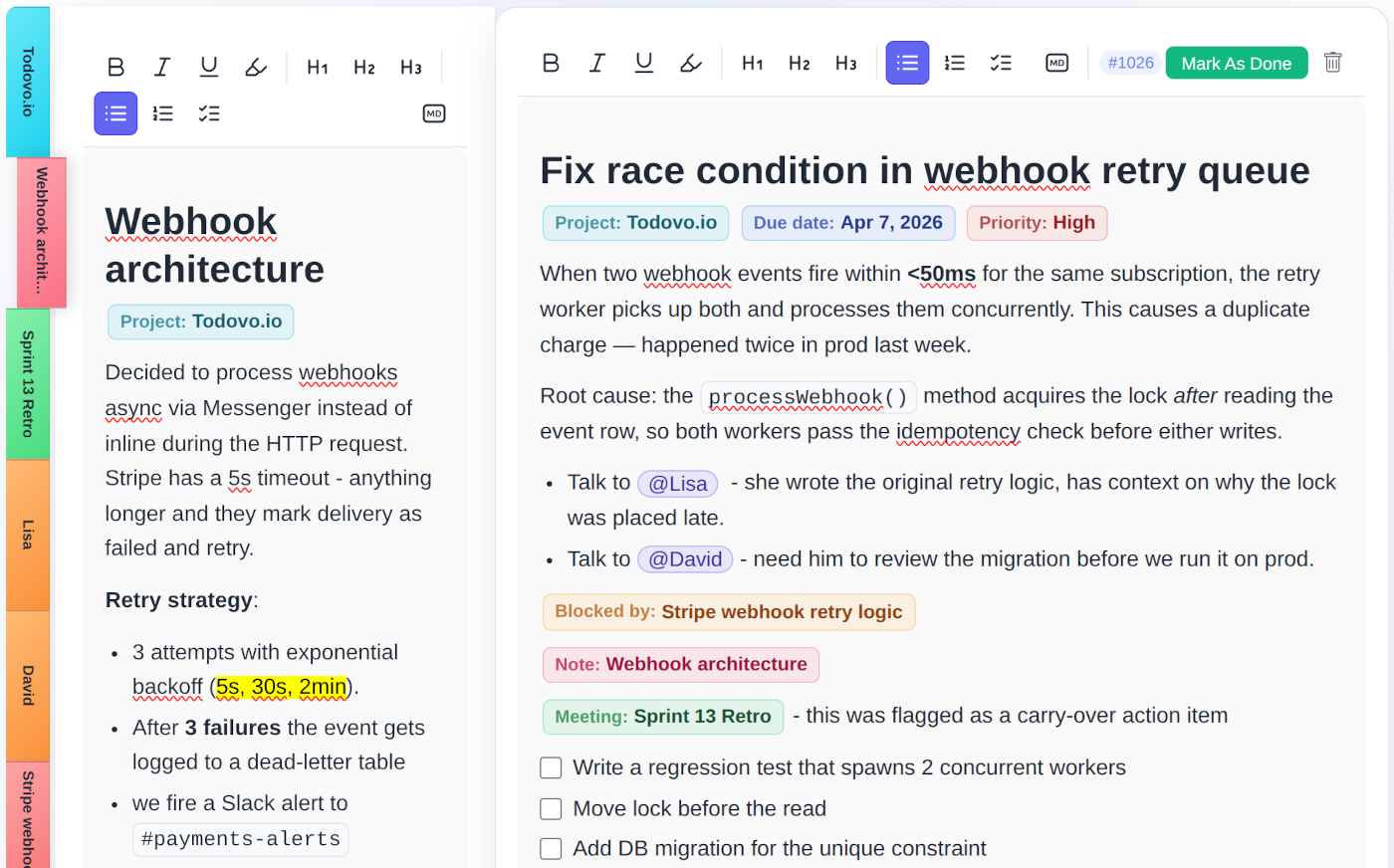
Every task is a rich document. Write implementation notes, break work into subtasks with /subtask, link a blocked-by dependency, attach a PDF spec, set a due date. All inline, all in one place.
- Slash commands: /subtask, /blocked-by, /due-date, /note
- Subtasks with checkboxes — no separate list required
- Blocked-by relationships between tickets
- File attachment (images, PDFs) directly in the editor
- Everything saves as you type
Quick reference IDs
Every task gets a short ID like #1023. Type it in the command palette to jump there instantly. Useful in standup, in PRs, and in Slack threads.
Real-time sync across tabs
Open todovo on two monitors. Updates appear live in both — no refresh, no merge conflicts in your task list.
Works alongside Jira and Linear
todovo is your personal layer — not a replacement for team tools. Use it to manage what you are working on today, while the team tracks the broader sprint.
Protect your deep work. Ship more. End the day with proof.
30-day free trial. No credit card. No feature gates. Cancel any time.